<img src="https://secure.leadforensics.com/794635.png" style="display:none;">
Skip to content
hf_20260224_130228_d32b6c60-9ac4-4717-908a-39410d12bea7
MCP Server

CodeHealth™ MCP Server

Enable AI coding assistants to detect and fix issues using CodeHealth™ guidance, keeping code maintainable and making legacy code AI-ready.

CodeHealth™

We created CodeHealth, a metric that predicts where AI coding agents will perform reliably and where they are likey to fail.

MCP Server

Productized in the CodeHealth™ MCP Server for safe, high-quality AI coding.

20%

Without structural guidance, frontier models fix only ~20% of issues.

90-100%

With MCP-augmented CodeHealth™ guidance, fix rates reach 90–100%.

60%

50% lower defect risk when AI works on healthy code.

How does it work?

STEP 1

Install the MCP server locally

Run the MCP server locally, fully under your control. Model-agnostic, it supports AI assistants and agents out of the box.

STEP 2

AI writes, guided by CodeHealth™

As AI writes code, the server checks changes against CodeHealth™ signals, detecting risk and preventing technical debt.

STEP 3

Self-correcting feedback loop

Every change is checked automatically. If risk increases, feedback is returned so the AI adjusts and retries in real time.

STEP 4

AI code is
re-evaluated

The AI refactors for maintainability, not just passing tests. The code is re-evaluated until CodeHealth™ thresholds are met.

STEP 5

AI code you'd actually approve

When the AI completes its task, the code is easier to review and evolve, so productivity lasts beyond the initial AI boost.

Empowering the world's top engineering teams
Signup

Keep AI-generated code maintainable

Scale safely, keep code quality high and increase delivery speed, while maintaining control.
Integrations

AI coding assistants
& IDEs

Designed for agentic workflows and composable AI tooling, not tied to any single editor, assistant or model.
GitHub Copilot GitHub Copilot
Cursor Cursor
ChatGPT ChatGPT

Codeium Codeium
Windsurf Windsurf

Claude Code Claude Code

JetBrains JetBrains

Visual Studio Code Visual Studio Code
Visual Studio Visual Studio

Solving AI's 3 hardest problems

Safeguard AI output, uplift legacy code and measure the real impact of refactoring.

Safeguarding AI

The CodeHealth™-aware MCP server continuously evaluates AI-generated changes against objective maintainability signals and feeds structured feedback back to the AI when risk increases. This creates a deterministic self-correcting loop that delivers easy to evolve code.

Uplift Unhealthy Code

AI works best on healthy, modular code. Large legacy functions make AI refactoring unreliable. CodeScene ACE, via the MCP server, restructures complex code into smaller, cohesive units. Refactorings are objectively verified by CodeHealth™, turning legacy code AI-ready.

ROI of Refactoring

CodeScene links CodeHealth™ scores to business outcomes via a validated statistical model. The MCP server exposes ROI impact on velocity, defect rates, and maintenance costs, so you can estimate how improving Code Health affects delivery and justify refactoring.

When will AI fail?

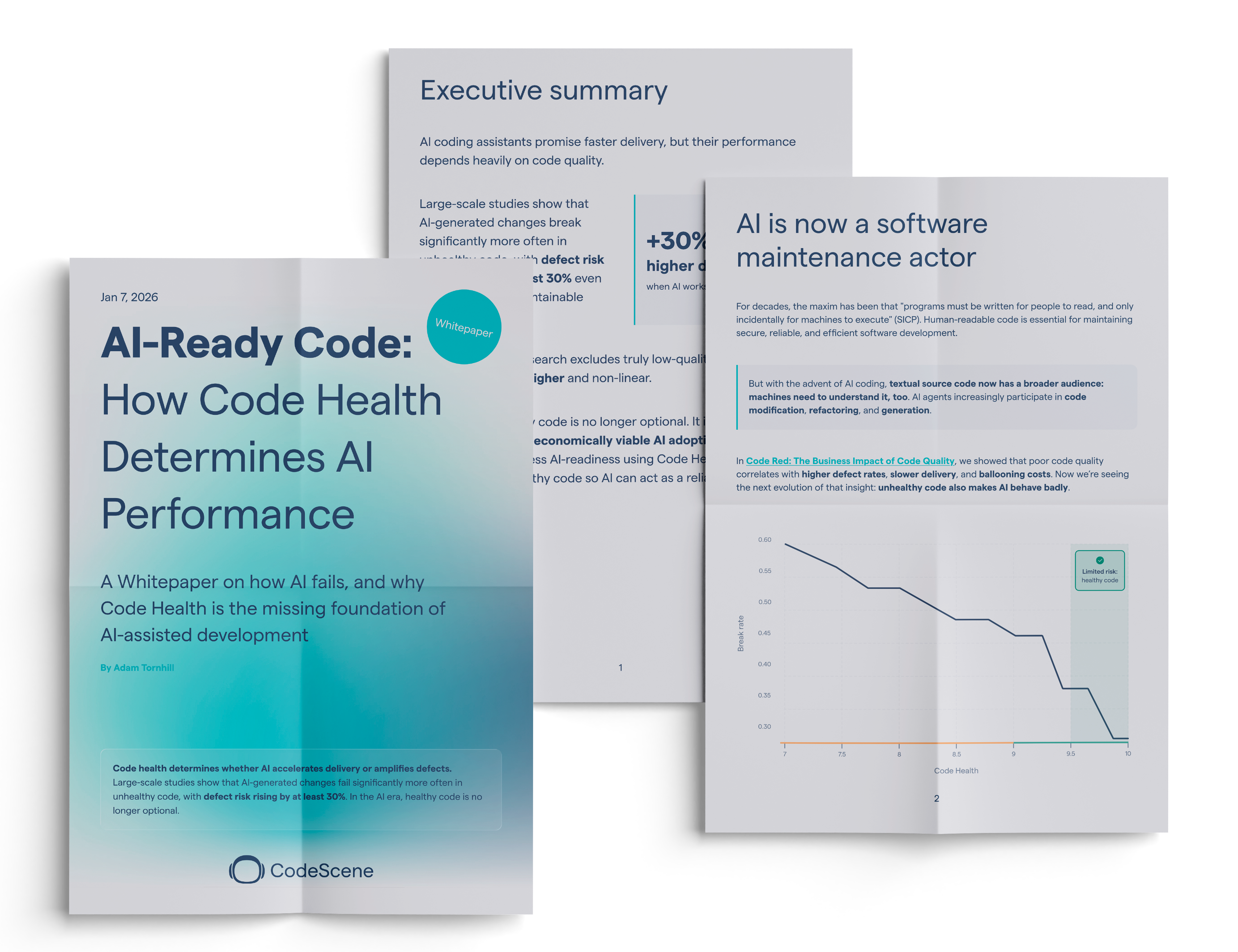
A large-scale study shows AI-generated changes fail far more often in unhealthy codebases with defect risk rising 30%+. In the AI era, healthy code isn’t optional.
CodeScene Whitepaper

Frequently asked questions

Can't find the answer here?
CodeScene is free for open-source projects. We also have a set of paid plans so that you can tailor CodeScene to your needs or analyze private repositories. This allows larger organizations to benefit from advanced analyses like CodeScene's cost metrics and delivery performance measures. We have a free trial so you can evaluate CodeScene before starting a plan.
CodeScene's license is based on the number of active authors. An active author is anyone who has committed code over the past three months to the codebases you want to analyze. This time period is a sliding window that always starts at the date of the most recent commit in your repositories. Each author is only counted once. That is, if you analyse multiple codebases, the same persons only count once no matter how many projects they contribute to. Historic authors are free. People who haven't committed code within the last three months are included for free and don't add to the license fee.
In all major aspects they are the same product but it makes it possible for you to integrate and use CodeScene no matter if your current tooling and handling of your source code is cloud based or running on private servers.
Cancellations can be done according to our terms which is 30 days before the end of the yearly subscription period. Monthly subscriptions can be cancelled at any time and will take effect the day after the last day of the current subscription period.
During the Free Trial period, you get access to all the features in the plan of your choice. When you start your trial you choose if you want to try the Standard or the Pro plan.
We accept all major credit cards and offer invoicing for enterprise customers.
There's no limit on the number of active authors. The total cost of using CodeScene is based on how many active authors you have. The number of users that can login and use any of the CodeScene features, such as the automatic pull request reviews, are unlimited.

It's easy. You purchase CodeScene at our website, see pricing. Choose between our On-Prem or cloud solution, add the amount of active authors you have, press purchase and follow payment instructions. Three clicks later you are done.

Do you want to scale up with more active authors?

For On-Prem just go to your personal site in our customer portal and upgrade the subscription. If you are running our Cloud version, just login to your CodeScene cloud, find your price plan, change to the new subscription. Scale up or down. Your choice.